Imagine losing access to an Outlook mailbox that contains years of important business emails, customer conversations, attachments, and other essential information. You have an OST file, but Outlook cannot open it because the original Exchange account is unavailable. What should you do next?
One possible solution is to convert the OST file into PST format. However, choosing the right conversion method can make a significant difference in the overall process.
Today, users can choose between professional OST to PST converter software and free conversion utilities. While freeware may work for basic requirements, professional applications often provide additional features for handling complex mailbox conversion tasks.
But does paid software always offer better value? Not necessarily. The right choice depends on your mailbox condition, conversion requirements, available features, and budget.
In this article, we will compare professional OST to PST converter software with freeware, examine their advantages and limitations, and explain how to select a suitable solution.
What Is OST to PST Conversion?
Microsoft Outlook uses two popular mailbox file formats: OST and PST.
OST stands for Offline Storage Table. It stores a synchronized local copy of mailbox information, allowing users to access supported Outlook data while working offline.
PST stands for Personal Storage Table. It is commonly used to store, archive, back up, and transfer Outlook mailbox information.
OST to PST conversion is the process of transferring mailbox information from an OST file into a PST file.
This conversion can be useful in several situations:
- Moving Outlook mailbox data to another computer.
- Creating an independent email backup.
- Accessing mailbox information after an account change.
- Migrating email data between Outlook profiles.
- Extracting information from supported orphaned OST files.
- Preserving important business email archives.
The challenge is that not every OST file can be exported using conventional Outlook methods. This is where specialized conversion software may become useful.
What Is Professional OST to PST Converter Software?
Professional OST to PST Converter Software is a specialized application developed to convert supported OST files into PST format.
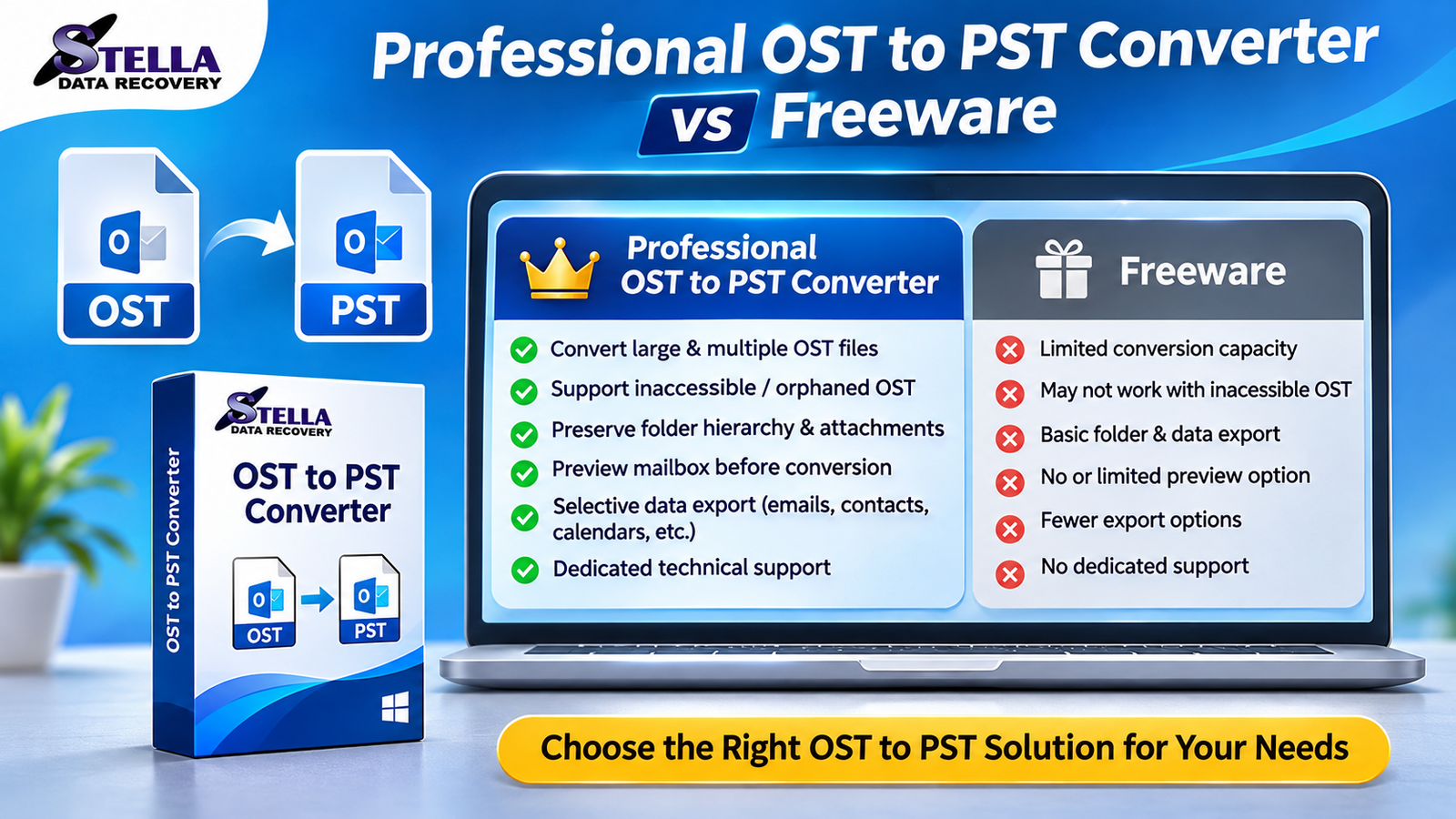
These applications generally offer more conversion controls than basic freeware utilities. Depending on the product, they may also support inaccessible OST files, batch processing, mailbox previews, and selective data export.
For example, an organization may need to convert several employee OST files after an Exchange Server migration. Processing every file manually can take considerable time. A professional application with batch conversion capabilities can simplify this task.
Important Features of Professional OST to PST Converter Software
1. Conversion of Inaccessible OST Files
Some professional converters can process OST files that are no longer accessible through their original Outlook profiles. This can be helpful when an Exchange account has been removed or a profile has become unavailable.
2. Bulk OST to PST Conversion
Bulk conversion allows users to add multiple OST files and process them within a single workflow. It is particularly useful for IT administrators and organizations managing multiple mailboxes.
3. Preservation of Email Attachments
Email attachments often contain important documents, invoices, reports, and business records. A reliable converter should support attachment preservation during the conversion process.
4. Maintenance of Folder Hierarchy
A well-designed conversion application should maintain the original mailbox folder structure, including Inbox, Sent Items, Drafts, Deleted Items, and custom folders, wherever supported.
5. Mailbox Preview Functionality
Preview functionality allows users to inspect mailbox contents before exporting them. It helps identify relevant folders and verify that the software can read the source data.
6. Selective Mailbox Export
Instead of converting an entire mailbox, users may be able to select particular folders or mailbox components. This can reduce unnecessary processing and simplify data management.
7. Advanced Scanning Options
Some professional applications provide scanning capabilities for supported damaged or inaccessible OST files. However, recovery results depend on the extent of file corruption.
What Is Free OST to PST Converter Software?
Free OST to PST converter software refers to utilities that provide basic conversion functionality without requiring an initial purchase.
These tools can be helpful for users who have simple conversion requirements and accessible Outlook mailbox data.
For example, if your Outlook profile is working correctly and you simply want to create a PST backup, Microsoft Outlook’s built-in Import/Export functionality may be sufficient.
However, third-party freeware applications can have certain restrictions. Some limit the number of emails that can be exported, while others provide only basic conversion features.
Common limitations may include:
- Restricted conversion capacity.
- Limited support for large OST files.
- No batch conversion functionality.
- Limited support for orphaned OST files.
- Fewer selective export options.
- Limited technical assistance.
It is important to remember that not all freeware products have the same limitations. Users should examine the actual features and licensing conditions before selecting a tool.
Professional OST to PST Converter vs Freeware: Detailed Comparison
Understanding the differences between professional software and freeware can help you make a more informed decision.
| Features | Professional Converter | Freeware |
|---|---|---|
| Basic OST conversion | Supported | Often supported |
| Inaccessible OST conversion | Available in some tools | Usually limited |
| Batch conversion | Often available | May be restricted |
| Large OST files | Product-dependent support | May have limitations |
| Email attachments | Commonly supported | Varies |
| Folder hierarchy | Often preserved | Varies |
| Mailbox preview | Available in many tools | Not always available |
| Selective export | Common feature | Often limited |
| Advanced scanning | Product-dependent | Usually limited |
| Technical assistance | Often available | Usually limited |
The comparison demonstrates that professional software generally provides more advanced functionality. However, freeware may be perfectly adequate for users who only need a straightforward mailbox export.
Advantages of Professional OST to PST Converter Software
Professional applications can offer several advantages for users with demanding conversion requirements.
Better Conversion Flexibility: Additional options can help users manage different OST file conditions and export requirements.
Time-Saving Features: Batch conversion and selective export can reduce repetitive manual work.
Improved Data Management: Mailbox previews and folder-selection features help users organize the conversion process.
Business-Oriented Functionality: Organizations may benefit from dedicated technical assistance, advanced export options, and support for larger workloads.
Specialized OST Processing: Certain applications are designed to handle supported orphaned, inaccessible, or damaged OST files.
These advantages can make professional software a practical investment when important mailbox information is involved.
Limitations of Freeware OST to PST Converters
Free conversion tools are attractive because they do not require an initial purchase. Nevertheless, users should consider their limitations.
A freeware application may not support every OST file condition. It might also restrict conversion capacity or provide fewer export settings.
Another important consideration is data security. Some unknown conversion utilities may have unclear privacy policies or unwanted bundled software.
Therefore, always download freeware from a trusted source and review its installation requirements before using it on confidential mailbox data.
How to Choose the Best OST to PST Converter Software
Selecting the best OST to PST converter requires evaluating more than just its price.
Consider these important factors:
1. OST File Compatibility: Verify whether the software supports your particular OST file condition, especially if it is orphaned or inaccessible.
2. Data Preservation: Check whether emails, attachments, folder hierarchy, and relevant message properties are maintained.
3. Conversion Performance: Evaluate processing speed and large-file support using your actual system requirements.
4. Batch Processing: Choose a tool with batch conversion if you regularly manage multiple OST files.
5. Preview Options: Preview functionality can help verify mailbox contents before conversion.
6. Windows Compatibility: Confirm compatibility with your Windows operating system and required Outlook environment.
7. Security and Reliability: Select a trusted software provider with transparent privacy practices and genuine customer support.
8. Free Trial Availability: A trial version allows you to evaluate the software before purchasing. Check whether it permits complete conversion or limits exported data.
Practical Tips for Safe OST to PST Conversion
Before starting the conversion process, follow these precautions:
- Create a backup copy of the original OST file.
- Check the available storage space on your computer.
- Close Outlook if required by the conversion application.
- Verify the converter’s compatibility with your OST file.
- Preview the mailbox contents before exporting.
- Avoid installing software from unknown websites.
- Open the resulting PST file in Outlook and verify important messages and attachments.
These simple steps can help reduce common conversion problems and protect valuable mailbox information.
Frequently Asked Questions (FAQs)
Q1. Which is better: professional OST to PST converter software or freeware?
Professional software is generally more suitable for complex conversion requirements, such as batch processing, inaccessible OST files, and selective mailbox export. Freeware is useful for basic conversion tasks.
Q2. Can I convert OST to PST without Microsoft Outlook?
Yes. Some standalone OST to PST converter applications can process supported OST files without requiring an active Outlook profile.
Q3. Is free OST to PST converter software reliable?
Some free tools are reliable for basic tasks. However, users should check their conversion restrictions, compatibility, security, and data preservation capabilities.
Q4. Can professional OST to PST software convert multiple files?
Many professional applications offer batch conversion functionality. The supported number of files depends on the particular software and license.
Q5. Does OST to PST conversion preserve attachments?
Many professional converters support attachment preservation. Always check the application’s features and verify the converted PST file.
Q6. Can I convert an orphaned OST file into PST format?
Yes, certain specialized converters support orphaned OST conversion. The outcome depends on file integrity and the application’s compatibility.
Q7. Should I purchase an OST to PST converter before testing it?
It is better to evaluate a free trial first, where available. Test its scanning, preview, compatibility, and export functionality before purchasing.
Conclusion
Professional OST to PST converter software and freeware both serve useful purposes, but they target different conversion requirements.
Freeware is a reasonable choice when the Outlook profile is accessible and users only need basic mailbox exporting. It can help avoid unnecessary software expenses for straightforward tasks.
On the other hand, professional OST to PST converter software may be more appropriate for handling multiple mailboxes, inaccessible OST files, large archives, and advanced conversion requirements.
Before making a decision, compare the available features, examine compatibility, review security practices, and test the conversion process.
The smartest approach is to choose an OST to PST converter based on your actual requirements rather than price alone. Protecting important emails, maintaining mailbox organization, and ensuring a reliable conversion process should always be the priority.