A password-protected 7z archive can be an effective way to store and protect important documents, backups, photographs, and other files. However, forgetting the password can create a frustrating situation, especially when the archive contains valuable information that cannot easily be replaced.
When this happens, users generally consider two options: 7z password recovery software or a manual password-recovery approach. But which method is more practical? The answer depends on how much information you remember about the password, the archive’s configuration, the size of the potential password search space, and the amount of technical effort you are willing to invest.
This guide compares both approaches, explains how they work, discusses their advantages and limitations, and provides a practical framework for choosing the right option.
Important: Password recovery should only be performed on 7z archives that you own or are authorized to access.
Quick Answer: 7z Password Recovery Software vs Manual Recovery
7z password recovery software is generally more convenient and accessible than manual recovery because it automates password-candidate generation, testing, and reporting.
Manual recovery can work when you remember the password or can create a highly targeted set of likely candidates. However, manually testing large numbers of possibilities is inefficient and difficult.
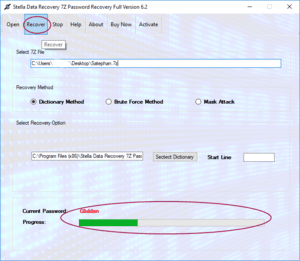
A dedicated recovery application may provide methods such as:
- Dictionary recovery
- Brute-force recovery
- Mask-based recovery
- Character-set configuration
- Search-progress monitoring
- Recovery reports
Neither approach can guarantee recovery of a strong, completely unknown password.
What Is 7z Password Recovery?
7z password recovery is the process of attempting to determine the password used to protect an encrypted 7z archive.
A recovery process does not normally involve simply deleting the password. Instead, possible password candidates are generated and tested against the encrypted archive.
Conceptually, the process looks like:
Candidate password → cryptographic verification → valid/invalid result
If a candidate is valid, the archive can be accessed using that password.
If the candidate fails, another possibility is tested.
This makes password complexity one of the most important factors affecting recovery.
What Is 7z Password Recovery Software?
7z Password Recovery Software is a specialized application designed to automate the process of testing potential passwords against supported 7z archives.
Instead of manually generating and testing candidates, the software manages the process according to the selected recovery method.
Depending on the application, users may be able to configure:
- Password length
- Character sets
- Known characters
- Possible words
- Number patterns
- Special characters
- Search masks
- Dictionary files
The software then performs the candidate-generation and verification process automatically.
What Is Manual 7z Password Recovery?
Manual recovery generally means trying to reconstruct or test possible passwords without relying on dedicated password-recovery software.
For example, if you remember that your password was probably one of the following:
- A project name
- A company name
- A familiar word
- A year
- A word followed by numbers
you can manually try those possibilities.
Manual recovery is most practical when the number of realistic candidates is very small.
If you remember the exact password except for one character, manually trying a handful of possibilities may be quicker than configuring specialized software.
How Does 7z Password Recovery Software Work?
Most recovery applications follow a structured workflow.
Step 1: Select the Archive
The user provides the encrypted 7z archive.
Step 2: Analyze the Archive
The software checks whether the archive is supported and determines whether it can perform the recovery operation.
Step 3: Choose a Recovery Method
The user selects a suitable strategy based on what they remember.
Step 4: Generate Candidates
The software generates possible passwords according to the selected configuration.
Step 5: Verify Candidates
Candidates are tested against the encrypted archive.
Step 6: Report the Result
If a valid password is found, the software reports it. Otherwise, the configured search continues or ends after the available candidates are exhausted.
Common Software-Based Recovery Methods
Dictionary Attack
A dictionary attack tests words and phrases from a predefined list.
It is useful when the password is likely to contain recognizable words.
For example, a user might remember that the password was based on a project name combined with a number.
Brute-Force Attack
A brute-force method systematically generates combinations from a selected character set.
It can be useful when very little is known about the password.
However, the search space can become extremely large as password length and character-set size increase.
Mask Attack
A mask attack is useful when you remember part of the password.
For example, you might remember:
Company + four digits
Instead of searching every possible password, the software can test candidates that follow the remembered pattern.
This can substantially reduce unnecessary searches.
Advantages of 7z Password Recovery Software
Automation
The primary advantage is automation. The application can generate and test candidates without requiring the user to perform each attempt manually.
Better Search Management
Dedicated software can organize complex searches using dictionaries, masks, character sets, and other configurations.
Progress Monitoring
Many applications provide information about the current recovery operation.
Reduced Manual Work
Users do not have to manually record every password candidate they have already tested.
Suitable for Larger Search Spaces
Although large search spaces can still be impractical, software is better suited than manual testing for systematically evaluating many candidates.
Limitations of 7z Password Recovery Software
Recovery software is not magic.
A tool cannot necessarily recover every password.
For example, a long randomly generated password may have an enormous search space. Even with powerful hardware, exhaustive testing may not be practical.
Recovery also depends on the quality of your configuration. An inefficient search strategy can waste considerable processing time.
Therefore, users should be cautious about claims such as:
- “Instant 7z password recovery”
- “100% guaranteed recovery”
- “Unlock every encrypted 7z archive”
A technically credible product should explain its supported recovery methods and limitations.
Advantages of Manual Recovery
Manual recovery has one major advantage: simplicity when the number of possible passwords is very small.
Suppose you remember that your password was almost certainly one of five variations of a familiar phrase. Trying those possibilities manually may be faster than installing and configuring software.
Other advantages include:
- No specialized software required
- Easy for a small number of known candidates
- No configuration required
- Useful when the exact password is almost remembered
Limitations of Manual Recovery
Manual recovery becomes impractical when the number of possibilities increases.
Imagine trying hundreds, thousands, or millions of possible passwords manually. The process would be:
- Enter candidate
- Attempt archive access
- Record result
- Try another candidate
- Repeat
This is inefficient and prone to mistakes.
Manual testing also becomes difficult when passwords contain combinations of uppercase letters, lowercase letters, numbers, and symbols.
7z Password Recovery Software vs Manual Recovery
| Factor | Recovery Software | Manual Recovery |
|---|---|---|
| Automation | High | Low |
| Ease of use | Generally easier for large searches | Easy for a few candidates |
| Dictionary support | Often available | Usually manual |
| Brute-force searching | Often available | Impractical manually |
| Mask searching | Often available | Difficult |
| Large candidate sets | More practical | Very inefficient |
| Progress tracking | Often available | Manual |
| Configuration | Requires setup | Minimal |
| Small number of known passwords | Useful | Often sufficient |
| Guaranteed recovery | No | No |
Which Method Should You Choose?
The best method depends on what you remember.
Choose manual recovery when:
- You remember the password almost completely.
- Only one or two characters are uncertain.
- You have a very small list of likely passwords.
- You do not want to install additional software.
Consider recovery software when:
- You have forgotten most of the password.
- You remember only a general pattern.
- You need dictionary-based searching.
- You need mask-based searching.
- You need to test a large number of candidates systematically.
A useful rule is:
The more possible passwords you need to test, the more valuable automation becomes.
How to Make 7z Password Recovery More Efficient
Before starting a recovery attempt, write down everything you remember.
Consider:
- Approximate password length
- First characters
- Last characters
- Possible words
- Numbers
- Special characters
- Uppercase letters
- Lowercase letters
- Possible dates
- Common password patterns you used previously
This information can help narrow the search space.
For example, knowing that a password starts with a particular word and ends with four numbers is much more useful than knowing only that the password “contains letters and numbers.”
Best Practices for Recovering a Forgotten 7z Password
Work With a Copy
Create a backup copy of the original archive before beginning recovery.
Start With the Most Likely Candidates
If you remember possible passwords, test those first.
Use Targeted Recovery
Use known information to configure dictionary or mask searches.
Be Patient With Large Searches
A large search space can take significant processing time.
Avoid Unrealistic Expectations
No recovery method can guarantee success against every password.
Store the Recovered Password Securely
Once recovered, save the password in a reputable password manager or another secure location.
Frequently Asked Questions
Is 7z password recovery software better than manual recovery?
For large numbers of possible passwords, software is generally more practical because it automates candidate generation and testing. Manual recovery can be better when only a few likely passwords exist.
Can I manually recover a forgotten 7z password?
Yes, if you remember enough information to create a small list of likely passwords. Manual recovery becomes impractical as the number of possibilities grows.
Can recovery software unlock every 7z archive?
No. Strong, long, and completely unknown passwords may be computationally impractical to recover.
Which 7z recovery method is fastest?
There is no universally fastest method. A targeted mask or dictionary search can be much more efficient than unrestricted brute force when you have useful information about the password.
Does 7z password recovery remove encryption?
Generally, recovery software attempts to discover the valid password rather than simply removing strong encryption.
Can I recover a 7z password if I remember part of it?
Yes, partial information can be useful. A mask-based search can sometimes use known characters and patterns to reduce the candidate space.
Final Word
The choice between 7z Password Recovery Software and manual recovery depends primarily on the number of possible passwords and the information you remember.
Manual recovery can be perfectly adequate when you have only a few likely password candidates. It requires little technical setup and can be the fastest option for simple situations.
However, when hundreds, thousands, or more possible passwords need to be evaluated, dedicated 7z password recovery software offers a significant advantage through automation. Dictionary, brute-force, and mask-based methods can systematically test candidates while providing tools for configuring and monitoring the search.