
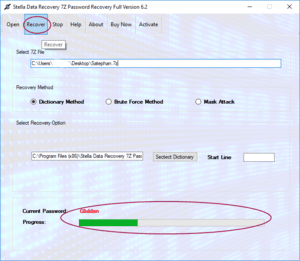
If you have forgotten the password of a 7z archive, finding reliable 7z Password Recovery Software can be an important step toward regaining access to an archive you own or are authorized to access. The right software can provide configurable password-search methods, support for encrypted 7z archives, and a convenient interface for managing recovery attempts.
So, where can you buy 7z Password Recovery Software? The safest option is usually to purchase it directly from the software developer’s official website or an authorized distributor. Buying from an official source helps users verify licensing, product compatibility, updates, technical support, and refund policies.
This guide explains where to purchase 7z Password Recovery Software, what to check before buying, how to compare products, and which features are important for a professional recovery workflow.
Where Can I Buy 7z Password Recovery Software?
You can generally buy 7z Password Recovery Software from the official website of the software developer.
An official product website should provide information such as:
- Product features
- Supported operating systems
- Supported archive formats
- Pricing and licensing
- Trial or demo availability
- Installation requirements
- Technical support
- Product documentation
- Refund or cancellation policies
Buying directly from the developer also makes it easier to obtain future software updates and legitimate license information.
If a product is sold through an authorized third-party distributor, verify that the distributor is officially recognized by the software publisher.
Why Buy From the Official Software Website?
Purchasing from an official source offers several advantages.
1. Genuine Software
An official website is the most reliable place to obtain an authentic version of the application.
This reduces the risk of downloading modified, outdated, or unauthorized software.
2. Valid License
Commercial recovery applications normally require a license for continued use or access to advanced functionality.
Purchasing directly from the developer helps ensure that the license is legitimate.
3. Product Updates
Password recovery applications may receive updates for operating-system compatibility, performance improvements, bug fixes, and additional archive support.
An official license can make it easier to obtain applicable updates.
4. Technical Support
Professional software may include customer or technical support.
This can be useful when dealing with large archives, unusual configurations, installation problems, or software compatibility questions.
5. Documentation
Official websites generally provide product guides, FAQs, system requirements, and other documentation that can help users understand how the application works.
What Should You Check Before Buying?
Don’t select software based only on the product name or price. Compare its features and limitations first.
1. 7z Compatibility
The software should clearly state that it supports the 7z archive format and the relevant encrypted archives.
The 7z format supports strong encryption, so compatibility with the archive configuration you are working with is important.
2. Recovery Methods
Look for software that provides recovery methods appropriate to your situation.
Common approaches include:
- Dictionary-based searching
- Mask-based searching
- Rule-based searching
- Brute-force or exhaustive searching
The appropriate method depends on how much you remember about the forgotten password.
3. Custom Search Options
Advanced configuration can make a recovery attempt more targeted.
Useful settings may include:
- Password length
- Known characters
- Character sets
- Prefixes
- Suffixes
- Number patterns
If you remember part of the password, these options can help reduce the search space.
4. Preview or Validation
If the application offers archive validation or preview functionality, this can help determine whether the selected archive is readable before starting a lengthy process.
5. Pause and Resume
Password searches can sometimes take considerable time. Pause-and-resume functionality can be useful when the process needs to be temporarily stopped.
6. Progress Monitoring
A professional application should provide clear information about the recovery process.
This can include:
- Current status
- Processing speed
- Search progress
- Elapsed time
- Completed candidates
7. Local Processing
For sensitive archives, local processing can be an important consideration.
Users should be cautious about uploading confidential archives to unknown online services. Software that processes the archive locally gives the user greater control over the data.
How Much Does 7z Password Recovery Software Cost?
The price varies by developer, edition, license type, and included features.
Some products offer:
- Free trials
- Demo editions
- Monthly licenses
- Annual licenses
- Perpetual licenses
- Personal licenses
- Business or commercial licenses
Before purchasing, check exactly what the license includes.
For example, a trial version may allow users to scan or preview an archive but require a paid license to complete the recovery process.
A business license may also have different usage conditions from a personal license.
Is Free 7z Password Recovery Software Available?
Yes, users can find free password-recovery utilities and open-source tools. However, free and commercial products can differ significantly in usability and features.
Free software may be suitable for technically experienced users who need basic functionality.
Commercial software may offer additional features such as:
- Graphical user interface
- Multiple recovery methods
- Advanced search configuration
- Progress monitoring
- Pause and resume
- Technical support
- Regular updates
- Batch processing
The right option depends on the user’s technical knowledge and recovery requirements.
Should You Buy a Lifetime License or Subscription?
This depends on how frequently you expect to use the software.
Lifetime License
A lifetime or perpetual license may be suitable for users who expect to use the product for several years.
Potential benefits include:
- One-time purchase
- No recurring subscription
- Long-term access to a specific product version
However, check whether future major-version upgrades are included.
Subscription License
A subscription can be useful for users who need continuing updates and support.
Potential benefits include:
- Regular updates
- Ongoing technical support
- Access to newer versions during the subscription period
Always read the vendor’s licensing terms before purchasing.
How to Compare 7z Password Recovery Software
A simple comparison table can help:
| Feature | Why It Matters |
|---|---|
| 7z support | Required for the target archive |
| Multiple recovery methods | Provides flexibility |
| Mask recovery | Useful when part of the password is known |
| Dictionary support | Useful for word-based passwords |
| Custom settings | Helps narrow the search |
| Progress monitoring | Tracks recovery status |
| Pause/resume | Useful for long operations |
| Local processing | Helps protect sensitive archives |
| Technical support | Useful for troubleshooting |
| Updates | Maintains compatibility |
| Trial version | Allows evaluation before purchase |
How to Buy 7z Password Recovery Software Safely
Follow these steps when purchasing:
Step 1: Find the Official Product Website
Search for the software by its exact product name and verify that you are visiting the developer’s legitimate website.
Step 2: Check the Product Page
Review features, supported operating systems, archive compatibility, and system requirements.
Step 3: Review Licensing
Determine whether the license is personal, commercial, subscription-based, or perpetual.
Step 4: Check the Trial Version
If a legitimate trial is available, use it to determine whether the software recognizes your archive and provides the functionality you require.
Step 5: Review Payment Security
Use the vendor’s official checkout system or a recognized authorized distributor.
Step 6: Keep Your License Information
After purchasing, securely store the license key, receipt, and account information.
Can You Buy 7z Password Recovery Software Online?
Yes. Most commercial 7z password recovery applications are distributed online.
Online purchasing is convenient because users can usually download the installer after completing the purchase.
However, avoid websites offering suspiciously cheap “full versions,” cracked software, or unauthorized license keys. Such downloads can create security, licensing, and data-privacy risks.
A legitimate product should provide clear information about the developer, license, support, and installation process.
Is 7z Password Recovery Software Safe?
Software itself does not make an archive recovery attempt automatically safe or unsafe. Safety depends on the software source, how the application processes data, and whether the user has authorization to access the archive.
For confidential data:
- Download software from a trusted source.
- Avoid cracked applications.
- Prefer local processing when appropriate.
- Keep security software enabled.
- Use a backup copy of the archive.
- Only recover archives you own or are authorized to access.
Can Purchased Software Guarantee Password Recovery?
No legitimate software can guarantee recovery of every 7z password.
Password recovery depends heavily on the complexity of the original password.
A predictable password may be considerably more practical to search for than a long, randomly generated password.
Therefore, be cautious about marketing claims such as “100% password recovery” or “instant recovery for every archive.”
A reputable vendor should explain the factors that influence recovery feasibility.
Frequently Asked Questions
Where can I buy 7z Password Recovery Software?
The safest place is generally the software developer’s official website or an authorized distributor. Check the vendor’s licensing, support, compatibility, and refund information before purchasing.
What is the best 7z Password Recovery Software to buy?
The best option depends on your requirements. Look for 7z compatibility, multiple recovery methods, configurable searches, local processing, progress monitoring, and reliable support.
Is it safe to buy 7z password recovery software online?
Yes, when purchasing from a legitimate developer or authorized distributor. Avoid cracked software and suspicious third-party downloads.
Can I try 7z Password Recovery Software before buying?
Some vendors provide trial or demo versions. Check the product’s official website to determine what functionality is available in the trial.
Can purchased software recover every forgotten 7z password?
No. Recovery depends on password complexity, available password clues, archive configuration, and computing resources.
Should I choose free or paid software?
Free software may be suitable for basic or technical use, while paid products may offer advanced features, easier interfaces, updates, and technical support.
Conclusion
The best place to buy 7z Password Recovery Software is generally the official website of the software developer or a verified authorized distributor. This approach helps users obtain legitimate software, valid licensing, product updates, documentation, and technical support.
Before making a purchase, compare 7z compatibility, recovery methods, search customization, progress monitoring, pause/resume functionality, local processing, licensing options, and customer support.
Most importantly, don’t choose software solely because it claims to offer guaranteed password recovery. Strongly protected 7z archives can be computationally difficult to recover when the original password is long and unpredictable.
For an effective purchasing decision, first identify what you remember about the password, determine which recovery methods you need, test a legitimate trial if available, and then choose a license that matches your personal or business requirements.