
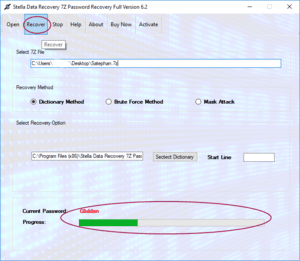
Forgetting the password of a 7z archive can be frustrating, especially when the file contains important documents, backups, or project data. A password-protected 7z archive cannot normally be opened without the correct password because encryption is designed to prevent unauthorized access.
So, how can you recover a forgotten 7z password? If you own the archive or are authorized to access it, you can try to recover the password using information you remember about it and specialized 7z Password Recovery Software. Depending on the situation, dictionary, mask, rule-based, or exhaustive password-search techniques may be available.
This guide explains how 7z password recovery works, which method to choose, what affects recovery time, and how to improve your chances of recovering an authorized archive.
Can a Forgotten 7z Password Be Recovered?
Yes, a forgotten 7z password may be recoverable, but recovery is not guaranteed.
The feasibility depends mainly on the complexity of the original password and how much information you remember.
For example, recovering a password that you remember was based on a particular word followed by four digits may be significantly more practical than searching for a completely random 20-character password.
Strong encryption is specifically designed to make guessing difficult. Therefore, no reputable recovery solution should promise that every forgotten 7z password can be recovered.
What Is a 7z Password?
A 7z password is used to protect an archive created in the 7z format. The 7z format is commonly used for compressing files and can support strong encryption.
A protected archive might contain:
- Documents
- Images
- Videos
- Software files
- Backups
- Business records
- Project files
When encryption is enabled, the password is required to access protected content.
If the password is forgotten, the archive may remain inaccessible unless the correct password can be recovered.
Why Do People Forget 7z Passwords?
Password-protected archives are often created for long-term storage. Users may not open them for months or years.
Common situations include:
- Forgotten archive passwords
- Old backup files
- Lost password notes
- Passwords stored on an unavailable computer
- Multiple archives using different passwords
- Legacy business archives
- Project files created by previous team members
In these situations, a recovery tool can help organize the search for the original password.
How Does 7z Password Recovery Work?
7z password recovery generally works by testing potential password candidates against the protected archive.
The software generates a candidate, checks whether it is correct, and then moves to another candidate if necessary.
The process may continue until the correct password is found or the selected search space has been exhausted.
The most important factor is therefore the size of the search space.
If you remember part of the password, you can often create a more targeted search instead of testing every possible combination.
Methods to Recover a 7z Password
Different recovery techniques are suitable for different situations.
1. Dictionary-Based Recovery
A dictionary attack tests words and combinations from a predefined list.
This method can be useful if you think your forgotten password was based on a familiar word, name, company name, or phrase.
For example, users may remember that the password was related to:
- A project name
- A company
- A person’s name
- A location
- A familiar phrase
A custom word list containing relevant terms can make the search more targeted.
2. Mask-Based Recovery
Mask-based recovery is useful when you remember part of the password.
Suppose you remember that the password starts with a particular word and ends with four numbers. Instead of testing every possible password, a recovery application can focus on combinations matching the remembered pattern.
This can significantly reduce the number of candidates that need to be tested.
Mask recovery can be particularly useful when users remember:
- Password length
- Beginning characters
- Ending characters
- Number positions
- Character types
- Partial words
3. Brute-Force Recovery
Brute-force recovery systematically tests possible combinations from a selected character set.
It can be useful when little information about the original password is available.
However, brute-force searching can become extremely time-consuming as password length increases.
For example, adding more characters to a password can increase the number of possible combinations dramatically.
Therefore, brute-force recovery should generally be treated as a last-resort approach when more targeted information is unavailable.
How to Recover a 7z Password Using Recovery Software
A typical recovery workflow looks like this.
Step 1: Make a Backup of the Archive
Before attempting recovery, create a duplicate of the original 7z file.
Use the copy for recovery whenever possible.
This ensures that the original archive remains preserved.
Step 2: Collect Password Clues
Think carefully about what you remember.
Write down:
- Possible words
- Names
- Numbers
- Password length
- Capitalization
- Special characters
- Prefixes
- Suffixes
- Approximate creation date or context
Even partial information can help reduce the search space.
Step 3: Choose a Recovery Method
Select the method that best matches your available information.
Remember a word? Try dictionary or rule-based recovery.
Remember part of the password? Consider mask-based recovery.
Remember almost nothing? An exhaustive search may be possible, but its practicality depends heavily on password length and character complexity.
Step 4: Configure the Search
Enter the known information into the recovery application.
Avoid selecting an unnecessarily large character set or password range when you already know some details.
Step 5: Start the Recovery Process
Start the search and allow the software to test password candidates.
Recovery time can range from relatively short to impractically long depending on the search space.
Step 6: Verify the Recovered Password
When the software identifies a candidate, use it to open the authorized archive and verify that the expected contents can be extracted.
Step 7: Store the Password Securely
Once recovered, save the password in a reputable password manager or another secure credential-management system.
What Affects 7z Password Recovery Time?
There is no fixed recovery time.
Several factors influence how long the process takes.
Password Length
Longer passwords generally produce larger search spaces.
Character Set
A password using lowercase letters only has fewer possible combinations than one using uppercase letters, lowercase letters, numbers, and symbols.
Known Information
Remembering part of the password can dramatically reduce the number of possibilities.
Hardware
Computer performance can affect how quickly password candidates are tested.
Recovery Method
A targeted mask or dictionary search can be much more efficient than an unrestricted exhaustive search when the password is predictable.
Can Every 7z Password Be Recovered?
No.
This is one of the most important limitations of password recovery.
If a 7z archive uses a long, random, strong password and you have no information about it, exhaustive recovery may be computationally impractical.
Therefore, password recovery software should be viewed as a tool for attempting recovery, not as a guaranteed way to defeat strong encryption.
What Features Should 7z Password Recovery Software Have?
If you need dedicated software, consider these features:
Multiple Recovery Methods
Support for dictionary, mask, rule-based, and brute-force methods provides flexibility.
Custom Search Settings
The ability to define password length, characters, or patterns can reduce unnecessary searching.
Pause and Resume
Useful for recovery operations that may take considerable time.
Progress Monitoring
Clear progress information helps users understand the current search status.
7z Compatibility
The software should support the relevant 7z archive and encryption configuration.
Local Processing
For confidential archives, local processing can reduce the risks associated with uploading private files to an unknown online service.
Windows Compatibility
Check whether the application supports your Windows version and hardware configuration.
Security Considerations
Only attempt to recover passwords for archives that you own or are authorized to access.
7z files can contain highly sensitive information, including personal documents, business records, source code, and financial data.
For sensitive archives, avoid uploading files to unknown online recovery services. A locally installed application can provide greater control over the archive and recovered information.
Download software from a trustworthy source and follow your organization’s security policies.
Frequently Asked Questions
How can I recover a forgotten 7z password?
You can try a suitable password recovery method based on what you remember about the password. Dictionary, mask, rule-based, and brute-force approaches may be available in specialized 7z Password Recovery Software.
What is the best method for recovering a 7z password?
There is no single best method. If you remember part of the password, a targeted mask or rule-based search can be more practical. If you remember likely words, dictionary-based recovery may be appropriate.
Can I recover a 7z password without knowing anything about it?
You can attempt an exhaustive search, but feasibility depends heavily on the password’s length and complexity. Strong random passwords can make this approach impractical.
Does 7z password recovery remove encryption?
Typically, recovery software attempts to identify the correct password rather than simply removing strong encryption.
Is 7z password recovery guaranteed?
No. Recovery depends on the password, archive configuration, available information, and computational resources.
Can I recover a 7z password on Windows?
Yes. Windows-compatible 7z Password Recovery Software can provide recovery methods for authorized archives.
Conclusion
Recovering a forgotten 7z password is possible in some situations, but success depends heavily on the password’s complexity and the information available about it. Dictionary, mask, rule-based, and brute-force methods each have different advantages.
The most effective strategy is usually to use whatever password clues you remember to reduce the search space. A targeted search can be considerably more practical than testing every possible combination.
For important archives, always work with a backup copy, preserve the original file, use reputable software, and store any recovered password securely.