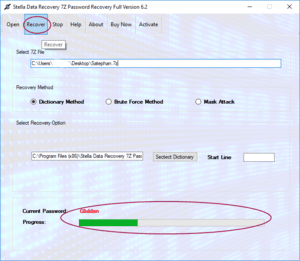
7z Password Recovery Software is a specialized utility designed to help authorized users regain access to password-protected 7z archives when the original password has been forgotten or lost. Depending on the archive, available password information, and software capabilities, recovery tools can test potential password candidates using techniques such as dictionary, mask, rule-based, and brute-force searching.
The 7z format is widely used because it provides efficient compression and supports strong encryption. However, strong protection also means that forgetting an archive password can make the contents difficult to access.
This guide explains what 7z Password Recovery Software is, how it works, when it can be useful, what recovery methods are available, and which features users should consider when selecting a recovery solution.
What Is 7z Password Recovery Software?
7z Password Recovery Software is a tool designed to help authorized users recover a forgotten password protecting a 7z archive.
A 7z archive can contain one or many files compressed into a single package. When encryption is enabled, the archive may require a password before its contents can be extracted.
Recovery software generally does not magically remove strong encryption. Instead, it attempts to identify the correct password by systematically testing possible password candidates against the protected archive.
The effectiveness of this process depends heavily on the complexity of the original password.
For example, a password based on a familiar word and a few numbers may be easier to target than a long, randomly generated password containing many characters.
Why Do Users Need 7z Password Recovery?
People often create password-protected archives for backup, storage, and file sharing. Over time, passwords can be forgotten or lost.
Common situations include:
- A user forgot the password for an old 7z backup.
- A password was stored on an unavailable computer.
- An archive contains important personal documents.
- A business needs to access an authorized legacy archive.
- A project archive was protected by a former employee.
- Several encrypted archives were created with different passwords.
In these situations, 7z Password Recovery Software can provide a structured way to search for the correct password.
How Does 7z Password Recovery Software Work?
The basic principle is password candidate testing.
The software generates a possible password and checks whether it successfully authenticates against the protected archive. If the candidate is incorrect, another candidate is generated.
This process continues until:
- The correct password is found,
- The configured search space is exhausted,
- Or the user stops the recovery process.
The number of possible passwords can become extremely large. Therefore, providing information about the forgotten password can significantly improve the efficiency of a recovery attempt.
What Are the Main 7z Password Recovery Methods?
Different recovery methods are appropriate for different password situations.
1. Dictionary-Based Recovery
Dictionary recovery tests words and password combinations from a predefined word list.
It can be useful when the password was likely based on:
- Names
- Common words
- Company names
- Project names
- Familiar phrases
- Frequently used passwords
A custom dictionary can be particularly useful when the user remembers words that may have appeared in the original password.
2. Mask-Based Recovery
Mask-based recovery is useful when part of the password is known.
For example, suppose a user remembers that a password begins with Project and ends with four numbers. Instead of testing every possible character combination, the software can focus on candidates matching that pattern.
Reducing the search space can make recovery substantially more practical.
3. Brute-Force Recovery
Brute-force recovery systematically tests combinations from a selected character set.
It can be useful when the user has very little information about the password. However, the search space grows rapidly as password length and character complexity increase.
A short password using only numbers has far fewer possibilities than a long password containing uppercase letters, lowercase letters, numbers, and symbols.
For example, it may test:
- Different capitalization
- Number additions
- Prefixes
- Suffixes
- Character substitutions
This approach can be useful when the user remembers the general password but not its exact formatting.
What Factors Affect 7z Password Recovery?
Recovery performance is influenced by several factors.
Password Length
Longer passwords generally create much larger search spaces.
Character Complexity
Passwords containing multiple character types create more possible combinations.
Password Predictability
Predictable passwords can often be targeted more efficiently than random ones.
Available Password Information
Knowing part of the password can dramatically reduce the search space.
Computer Hardware
CPU performance and supported acceleration technologies can influence how quickly candidates can be tested.
Software Implementation
Different recovery applications may use different algorithms and optimization techniques.
Can Every 7z Password Be Recovered?
No. 7z Password Recovery Software cannot guarantee recovery of every forgotten password.
Strong encryption is specifically designed to make unauthorized password guessing difficult. If a password is long, random, and completely unknown, exhaustive searching may require an impractical amount of time or computing resources.
This is why reputable software should clearly explain its limitations rather than claiming guaranteed recovery for every archive.
Can 7z Password Recovery Software Remove Encryption?
Generally, password recovery and encryption removal are not the same thing.
Recovery software typically attempts to identify the correct password rather than simply deleting strong encryption.
Once the correct password has been identified, the user can use it to open and extract the authorized archive.
This distinction is important when evaluating claims made by password-recovery products.
What Features Should Good 7z Password Recovery Software Have?
Users evaluating recovery software should consider several technical features.
Multiple Recovery Methods
Support for dictionary, mask, rule-based, and brute-force techniques provides flexibility.
Custom Search Configuration
The ability to specify known characters, password length, or patterns can reduce unnecessary searching.
Progress Monitoring
A clear progress indicator helps users understand the status of a recovery operation.
Pause and Resume
Password searches can sometimes take considerable time. Pause-and-resume functionality allows users to continue the operation later.
7z Compatibility
The application should support the archive and encryption configuration being processed.
Local Processing
For confidential archives, local processing can provide greater control over sensitive data.
Windows Compatibility
Users should verify support for their Windows version and system architecture.
How to Use 7z Password Recovery Software
A typical workflow looks like this:
Step 1: Create a Backup
Make a copy of the original 7z archive and perform the recovery process using the copy.
Step 2: Gather Password Clues
Record anything remembered about the password, such as:
- Possible words
- Numbers
- Length
- Capitalization
- Special characters
- Prefixes or suffixes
Step 3: Select a Recovery Method
Choose dictionary, mask, rule-based, or brute-force recovery according to the available information.
Step 4: Configure the Search
Use known password information to reduce the candidate space.
Step 5: Start the Recovery
Allow the application to test the configured candidates.
Step 6: Verify the Password
Once a candidate is identified, test it against the archive and confirm that the expected files can be extracted.
Step 7: Secure the Recovered Password
Store the recovered password securely in a reputable password manager or other appropriate credential-management system.
Security and Privacy Considerations
7z archives can contain confidential documents, personal information, source code, financial records, or business data.
Users should therefore be careful when selecting password recovery software.
For sensitive archives, local processing can be preferable to uploading files to an unknown online service.
Users should also download recovery software from reputable sources and scan downloaded applications according to their normal security procedures.
Most importantly, password recovery should only be performed on archives that the user owns or is authorized to access.
How to Prevent Forgotten 7z Passwords
Password recovery can be avoided with better credential management.
For important archives:
- Store passwords in a reputable password manager.
- Maintain secure backups.
- Use documented organizational procedures.
- Avoid relying solely on memory.
- Keep archive passwords associated with the correct project or backup.
- Periodically verify access to important archives.
For businesses, critical archive credentials should not depend on a single employee’s memory or personal storage.
Frequently Asked Questions
What is 7z Password Recovery Software?
7z Password Recovery Software is a utility designed to help authorized users recover forgotten passwords from protected 7z archives by testing possible password candidates.
Can I recover a forgotten 7z password?
Recovery may be possible depending on password complexity, available clues, archive configuration, and the capabilities of the recovery software.
What is the best 7z password recovery method?
There is no single best method. Dictionary or rule-based approaches may work well for predictable passwords, while mask recovery is useful when part of the password is known. Brute-force searching may be considered when little information is available.
Can 7z password recovery be guaranteed?
No. A long and unpredictable password may make recovery computationally impractical.
Can I recover a 7z password without 7-Zip?
Depending on the application, specialized recovery software may process compatible 7z archives independently. Users should verify the software’s supported archive and encryption types.
Is online 7z password recovery safe?
Users should be cautious with online services because uploading a confidential archive can create privacy and security risks. Local processing can provide greater control over sensitive files.
Conclusion
7z Password Recovery Software provides a structured approach for authorized users who have forgotten the password protecting a 7z archive. Depending on the information available, recovery applications can use dictionary, mask, rule-based, or brute-force techniques to search for the original password.
However, recovery is not guaranteed. Password length, randomness, character complexity, archive configuration, and available computing resources can significantly affect the feasibility of the process.
For the best results, preserve the original archive, work with a backup copy, use remembered password information to narrow the search, choose reputable software, and securely store any recovered credentials.