Can I Convert an Orphaned OST? A Complete Guide to OST Recovery and PST Conversion
Yes, an orphaned OST file can sometimes be converted or recovered into PST format using specialized OST to PST conversion software. However, the result depends on the condition of the OST file, the type of Outlook account associated with it, available mailbox data, and the capabilities of the software being used.
An orphaned OST is typically a local Outlook data file that is no longer connected to its original mailbox, Outlook profile, or server account. This can happen after an account is deleted, a profile is recreated, an employee leaves an organization, or a server-side mailbox becomes unavailable.
For users who need to preserve important emails and other mailbox information, converting an orphaned OST to PST can be a practical data-recovery and migration option.
This guide explains what an orphaned OST is, why it becomes inaccessible, whether it can be converted without Outlook, how the conversion process works, and what users should consider before choosing OST to PST Converter Software.
What Is an Orphaned OST File?
An orphaned OST file is an OST file that is no longer associated with the Outlook profile or mailbox that originally synchronized it.
OST files are designed primarily for offline synchronization with supported server-based Outlook accounts. Under normal circumstances, Outlook maintains a relationship between the local OST and the associated mailbox.
If that relationship is broken, the OST may remain on the computer but become inaccessible through the original Outlook configuration.
For example, an employee may leave a company and their Microsoft 365 or Exchange account may be disabled. The employee’s old computer may still contain an OST file with historical mailbox data. If authorized, the organization may need to recover that information.
Why Does an OST Become Orphaned?
Several situations can cause an OST to become disconnected from its original environment.
Account Removal
If the associated mailbox account is removed or disabled, the local OST may no longer synchronize.
Outlook Profile Deletion
Deleting the Outlook profile associated with the OST can make it difficult to access the file through the normal Outlook interface.
Server or Mailbox Changes
Changes to the Exchange or Microsoft 365 environment can break the original relationship between the OST and mailbox.
Employee Departure
Organizations may retain a former employee’s computer or backup files after their account has been deactivated.
Computer Migration
Moving Outlook data between computers without the original profile can also result in an inaccessible OST.
Damaged Outlook Profile
A corrupted profile may prevent Outlook from correctly associating with an existing OST.
Can I Convert an Orphaned OST to PST?
Yes, in some cases an orphaned OST can be converted to PST using specialized OST recovery and conversion software.
However, conversion is not guaranteed for every OST file.
The software must be able to read the file’s internal structure and extract the mailbox data that remains accessible.
Successful recovery may depend on:
- OST file condition
- File size
- Outlook version
- Account type
- Encryption or protection mechanisms
- Available mailbox data
- Software compatibility
- Degree of file corruption
A trustworthy conversion solution should clearly describe these limitations rather than promise that every OST file can be recovered.
Can I Convert an Orphaned OST Without Outlook?
Depending on the software, an orphaned OST can be processed without having Outlook installed or configured.
This is one of the main reasons users look for standalone OST to PST Converter Software.
A standalone application can analyze the OST file directly, identify recoverable folders, preview mailbox items, and export supported data to PST.
This can be useful when:
- Outlook is no longer installed.
- The original Outlook profile is unavailable.
- The original mailbox has been disabled.
- The original server cannot be accessed.
- The user only has the OST file.
Before purchasing or installing software, verify that it specifically supports orphaned OST recovery without Outlook.
How Does Orphaned OST to PST Conversion Work?
Although interfaces differ between applications, the general process follows several steps.
Step 1: Locate the Orphaned OST
Find the original OST file on the computer or backup storage.
Do not modify the original file.
Step 2: Create a Backup Copy
Make a duplicate of the OST and perform recovery using the copy.
This provides an additional layer of protection if the conversion process encounters an unexpected problem.
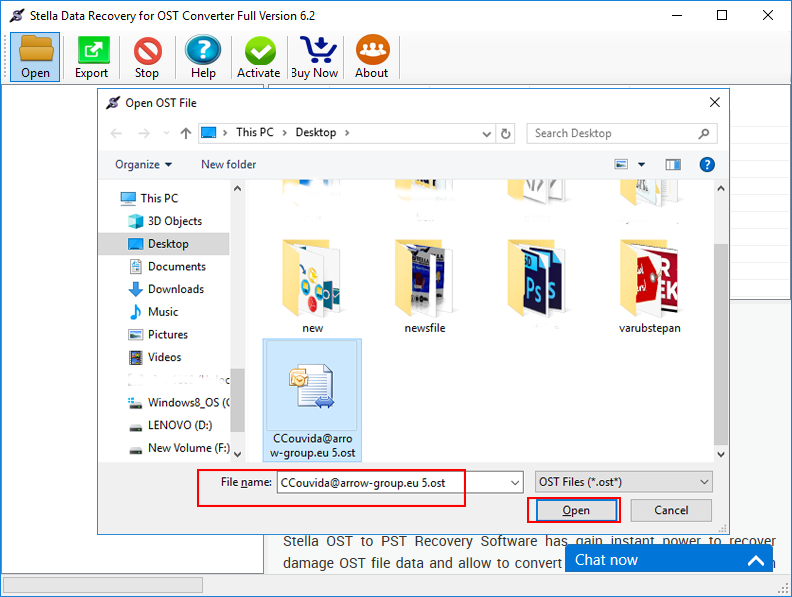
Step 3: Load the OST Into the Software
Open the recovery application and select the orphaned OST file.
The software scans the file and analyzes its internal structure.
Step 4: Preview Recoverable Data
If preview functionality is available, examine the mailbox folders and messages.
Common folders may include:
- Inbox
- Sent Items
- Drafts
- Deleted Items
- Contacts
- Calendar
- Tasks
- Custom folders
Previewing helps determine whether the required information remains accessible.
Step 5: Select Required Items
Some applications allow selective recovery.
Instead of converting everything, you may select particular folders or messages.
This can be useful when the OST contains a large amount of unnecessary information.
Step 6: Select PST as the Output
Choose PST as the destination format.
Specify a secure location with sufficient disk space.
Step 7: Start the Conversion
The application processes the selected OST data and creates a PST containing the supported mailbox information.
Step 8: Verify the Result
Open the resulting PST in a suitable Outlook environment and inspect important mailbox items.
Check emails, attachments, contacts, calendars, and folder organization.
What Data Can Be Recovered From an Orphaned OST?
The exact data depends on what remains in the source file and what the conversion software supports.
Potentially recoverable items may include:
- Emails
- Email attachments
- Contacts
- Calendar entries
- Tasks
- Notes
- Custom folders
- Email metadata
However, not every item is guaranteed to be recoverable.
If an item was never synchronized to the local OST, it may not be available in the file. Similarly, severe corruption can affect specific mailbox items.
Can an Orphaned OST Be Repaired Instead of Converted?
In some situations, users may consider repairing the Outlook environment rather than converting the OST.
If the original mailbox and account are still accessible, reconnecting Outlook to the mailbox may be preferable to standalone conversion.
However, if the original account has been permanently removed or the OST is no longer associated with its profile, reconnecting may not be practical.
In such cases, extracting available data into PST may provide a more suitable approach.
What Features Should OST Recovery Software Have?
When evaluating OST to PST Converter Software, consider the following features.
OST Preview
A preview allows users to determine whether required data is available before starting the export.
Selective Recovery
Users should be able to select specific folders or mailbox items when necessary.
PST Export
The application should create a usable PST containing the selected data.
Attachment Recovery
Attachments are often critical in business email archives, so support for attachment extraction is important.
Folder Structure Preservation
Maintaining the original mailbox hierarchy can make the recovered PST easier to use.
Large OST Support
Enterprise OST files can be large, so check the software’s supported file sizes.
Outlook-Independent Operation
For orphaned files, standalone operation can be particularly important because the original Outlook environment may no longer exist.
What If the OST File Is Corrupted?
A corrupted OST can make recovery more difficult.
Symptoms may include:
- Application errors
- Missing folders
- Incomplete messages
- Unexpected file behavior
- Failed scanning
- Missing attachments
Some specialized recovery applications include algorithms designed to extract data from damaged files. However, severe corruption can still limit recovery.
Always work on a copy and preserve the original file.
How to Improve the Chances of Successful OST Recovery
There are several practical steps users can take.
1. Stop modifying the original file.
Avoid repeatedly opening or altering the source.
2. Create a backup.
Keep multiple secure copies when the data is important.
3. Use targeted recovery.
If you only need specific folders, selective conversion can simplify the process.
4. Check the file first.
Use preview functionality to confirm recoverable content.
5. Verify the resulting PST.
Do not assume that a successful conversion automatically means every mailbox item was recovered.
6. Keep the source file.
Store the original OST until the recovery has been fully validated.
Frequently Asked Questions
Can I convert an orphaned OST?
Yes, an orphaned OST can sometimes be converted into PST using specialized OST recovery and conversion software. Success depends on the condition and accessibility of the source file.
Can I convert an orphaned OST without Outlook?
Yes, some dedicated OST to PST converters can process orphaned OST files without requiring Outlook to be installed or the original profile to be available.
Is every orphaned OST recoverable?
No. Recovery depends on the file condition, available data, encryption, corruption level, and software capabilities.
Can I recover attachments from an orphaned OST?
Attachments may be recoverable when they are present and accessible within the OST. Always verify several converted messages after the process.
Can I recover contacts and calendars from an orphaned OST?
Some conversion applications support contacts, calendars, tasks, and other Outlook items. Check the software’s supported data types before starting.
Should I delete the original OST after conversion?
No. Keep the original OST until the resulting PST has been thoroughly checked and securely backed up.
Conclusion
An orphaned OST can sometimes be converted to PST, even when the original Outlook profile or mailbox is no longer available. Specialized OST to PST Converter Software can analyze the local file, preview accessible mailbox information, and export supported emails and other Outlook items into a PST.
However, users should understand that OST recovery is not guaranteed. File condition, corruption, encryption, synchronization status, and software capabilities can all affect the result.
The safest approach is to create a backup of the original OST, work with a copy, preview the recoverable data, selectively convert important folders when possible, and thoroughly verify the resulting PST.