Introduction: Choosing the Right Password Recovery Method
Have you ever forgotten the password to an important 7z archive containing documents, business files, or personal data? A password-protected archive can become difficult to access when the original password is lost. Fortunately, password recovery software may help users regain access to archives they own or are authorized to recover.
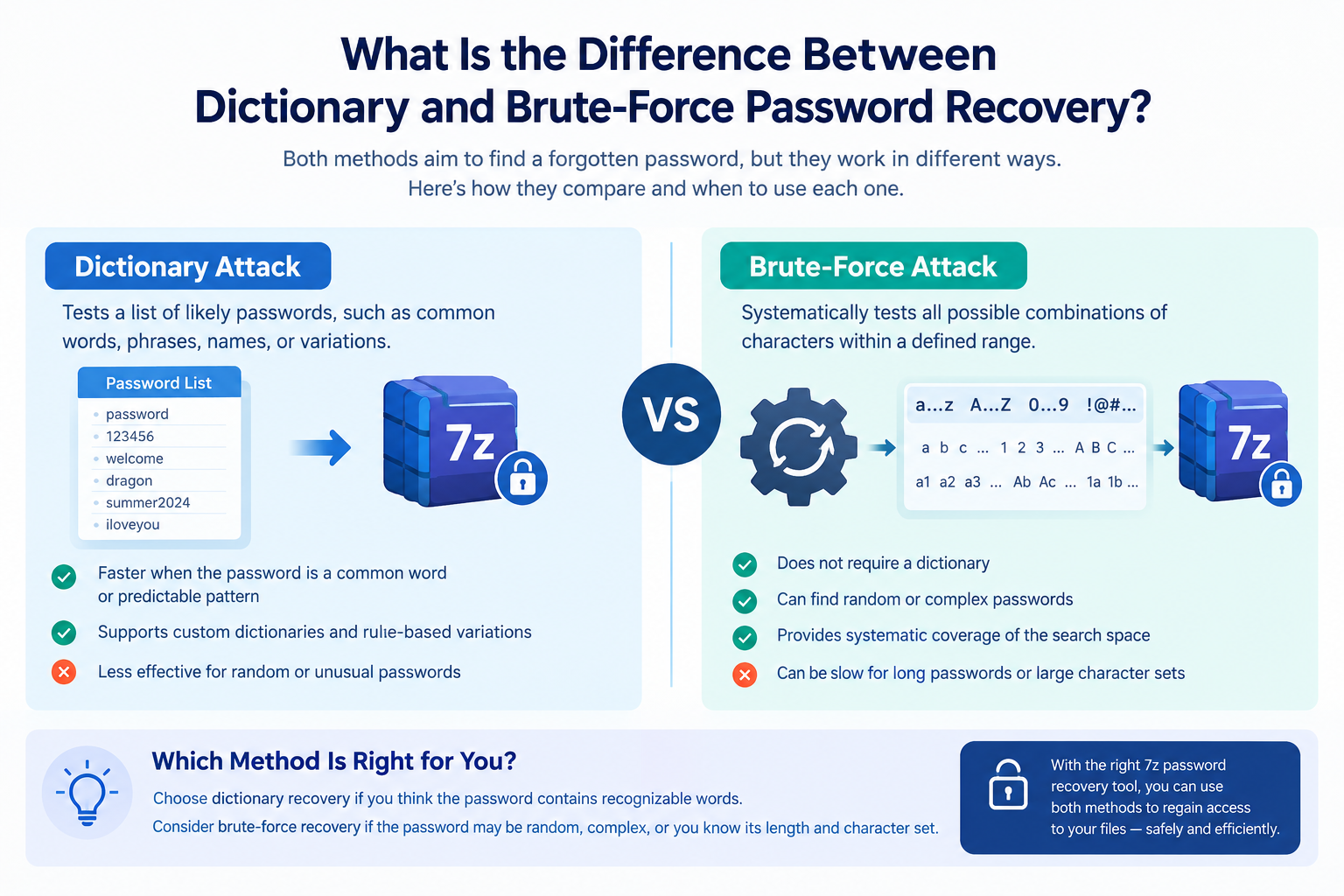
Two commonly used techniques are dictionary attacks and brute-force attacks. Both attempt to identify a password, but they work differently. A dictionary attack tests words and likely password combinations, while a brute-force attack systematically explores possible character combinations.
Understanding these methods helps users choose appropriate 7z password recovery software, estimate potential recovery time, and make informed decisions about protecting sensitive data.
What Is Dictionary Password Recovery?
A dictionary attack is a password recovery method that tests a collection of predefined words and password candidates. Instead of checking every possible combination, it prioritizes passwords that people are more likely to use.
A dictionary may contain common words, frequently used passwords, names, dates, and variations involving numbers or special characters.
For example, a user might create a password based on a familiar word, such as a hobby, a memorable phrase, or a common expression. Dictionary-based recovery can test relevant candidates before moving to less likely possibilities.
How Does a Dictionary Attack Work?
The process generally involves the following steps:
- Prepare a candidate list: The recovery software loads a dictionary of possible passwords.
- Generate variations: Depending on the tool, it may modify words by adding numbers, changing capitalization, or including symbols.
- Test candidates: The software checks each candidate against the protected archive.
- Identify a match: If a candidate matches the original password, the software can report the result.
The effectiveness of this method depends heavily on the quality of the candidate list and how closely it matches the password creator’s habits.
Advantages of Dictionary Recovery
- Efficient for predictable passwords: It can find passwords based on common words or familiar patterns.
- Useful when clues are available: Known information about the password format can help narrow the candidate list.
- Potentially faster than exhaustive searching: It avoids testing countless unlikely combinations.
- Flexible candidate selection: Some tools support custom dictionaries and rule-based variations.
Limitations of Dictionary Recovery
Dictionary attacks may fail when a password is random, unusually long, or unrelated to common words. A candidate list that does not reflect the original password can waste time without producing a result.
What Is Brute-Force Password Recovery?
A brute-force attack systematically tests possible password combinations within a defined character set and search range. Unlike a dictionary attack, it does not depend on a list of likely words.
For example, a search might begin with short combinations and progressively test longer strings using letters, digits, and selected symbols. The exact process depends on the recovery software’s configuration.
How Does Brute-Force Recovery Work?
A typical process includes these stages:
- Define the character set: Select the letters, numbers, and symbols that may appear in the password.
- Set the search range: Specify the minimum and maximum password lengths.
- Generate combinations: The software systematically produces candidates.
- Test each candidate: It checks whether a candidate unlocks the protected archive.
- Stop when successful or exhausted: The search ends when a match is found or the configured search space has been explored.
The principal advantage of brute-force recovery is that it can cover a defined search space without relying on a password dictionary. However, comprehensive searches can require substantial computing time.
Advantages of Brute-Force Recovery
- Does not require a dictionary: It can test passwords that are not ordinary words.
- Can explore unusual combinations: Random-looking passwords may fall within the configured search range.
- Provides systematic coverage: A properly configured search can cover all combinations within its defined limits.
- Supports targeted searches: Restricting character types or password length can reduce the number of candidates.
Limitations of Brute-Force Recovery
The number of possible passwords increases rapidly as password length and character variety increase.
For example, a password consisting of eight lowercase letters has (26^8) possible combinations. Expanding the character set to include uppercase letters, digits, and symbols increases the search space significantly.
Consequently, brute-force recovery may be impractical for long passwords protected by strong encryption. A tool cannot guarantee quick recovery merely because it supports brute-force searching.
Dictionary vs. Brute-Force Recovery: Key Differences
| Feature | Dictionary Attack | Brute-Force Attack |
|---|---|---|
| Basic approach | Tests likely password candidates | Systematically tests combinations |
| Requires a dictionary | Yes, or another candidate list | No |
| Best suited for | Common words and predictable passwords | Passwords within a manageable search space |
| Typical speed | Often faster when candidates are relevant | Depends heavily on search-space size |
| Random passwords | Usually less effective | May work if the search space is manageable |
| Long passwords | Can succeed if the password is predictable | Can become computationally impractical |
| Customization | Dictionary and variation rules | Character sets and length ranges |
| Guaranteed success | No | Only within a fully covered search space, assuming correct implementation and sufficient resources |
Neither method is universally better. The right choice depends on the password’s likely structure, the archive’s encryption, available computing resources, and the recovery software’s capabilities.
Which Method Is Better for 7z Password Recovery?
For a forgotten 7z archive password, the best starting point depends on what you remember.
Choose dictionary recovery when:
- You remember that the password contains recognizable words.
- You commonly use predictable phrases or word-based patterns.
- You have clues about the password’s wording or structure.
Consider brute-force recovery when:
- The password may contain arbitrary letters, numbers, or symbols.
- You know the approximate password length.
- You can reasonably restrict the possible character set.
Some password recovery applications also provide mask-based searching. This technique uses known information about a password’s structure to reduce the number of combinations that must be tested.
For example, knowing that a password starts with a particular word or contains a known number of digits can substantially narrow the search.
For authorized recovery, start with the most informative clues you have rather than immediately launching an unrestricted search.
How 7z Encryption Affects Recovery Time
The recovery method is only one factor affecting performance. The archive’s encryption and password characteristics also matter.
The 7z format commonly supports AES-256 encryption. Strong encryption can make password verification computationally expensive, depending on the archive’s settings. This means each candidate may take time to test.
Important factors include:
- Password length: Longer passwords generally create more possible combinations.
- Character diversity: Adding uppercase letters, digits, and symbols expands the search space.
- Password predictability: A predictable password may be found quickly through candidate-based searching.
- Hardware performance: Processor and supported GPU capabilities may influence testing speed.
- Encryption parameters: The archive’s settings affect the cost of checking each candidate.
No responsible recovery tool should promise that every forgotten password can be recovered within a fixed time. Recovery may take minutes, days, or substantially longer, and some passwords may remain impractical to recover.
How to Choose Reliable 7z Password Recovery Software
When evaluating a 7z password recovery tool, consider more than its advertised recovery speed.
Look for software that offers:
- 7z archive compatibility: Confirm that it supports the archive type and encryption configuration you need.
- Multiple recovery methods: Dictionary, brute-force, and mask-based options provide greater flexibility.
- Configurable search settings: Character sets, password length, and candidate rules help narrow searches.
- Clear trial limitations: Understand which features are available before purchasing.
- Local processing options: Offline processing can help keep confidential archives on your own computer.
- Transparent pricing and support: Review licensing terms, system requirements, updates, and technical assistance.
Test software with an archive you own or are authorized to access. Avoid uploading confidential archives to unknown online recovery services.
Frequently Asked Questions
1. Is a dictionary attack faster than brute-force recovery?
It can be faster when the password appears in the dictionary or matches its variations. If the candidate list is unsuitable, it may fail while a broader search continues.
2. Can brute-force recovery find any 7z password?
Not necessarily in a practical timeframe. It can cover a defined search space, but very long passwords and expensive encryption settings can make exhaustive recovery prohibitively slow.
3. Which method works best for a forgotten 7z password?
Dictionary recovery is a sensible starting point when the password may contain familiar words. Brute-force or mask-based recovery may be more appropriate when you know its length or character pattern.
4. Does 7z password recovery software work on Windows 11?
Some tools support Windows 11, but compatibility varies. Check the vendor’s current system requirements before installation.
5. Is free 7z password recovery software reliable?
Free tools can be useful, but capabilities, compatibility, documentation, and support differ. Evaluate the tool carefully before trusting it with important archives.
Conclusion
Dictionary and brute-force recovery solve the same problem through different approaches. Dictionary attacks prioritize likely passwords, making them useful for predictable word-based combinations. Brute-force attacks systematically explore possible combinations, but their effectiveness depends on the size of the search space and available computing resources.
For users recovering their own password-protected 7z archives, the most practical approach is to use available clues, select appropriate recovery settings, and choose reputable software with transparent capabilities.
Need to recover a forgotten 7z archive password? Evaluate a trusted 7z Password Recovery Tool that supports the recovery methods you need. Review its system requirements and trial limitations, test it with an authorized archive, and choose a solution that fits your recovery needs before purchasing.
Call to action: Download the free trial of a suitable 7z password recovery tool to evaluate its features and compatibility before buying.